The star quest
Their own app. Jobs earn stars, and stars buy screen time.
Your child sees their jobs, their stars and the time those stars have bought. You set the rules behind it, so screen time is something you agreed rather than something you fight about.
Free to start, no card. The child’s app is part of membership, and yours to try in the four free days.
Already have an account? Sign in
On their side
What your child sees
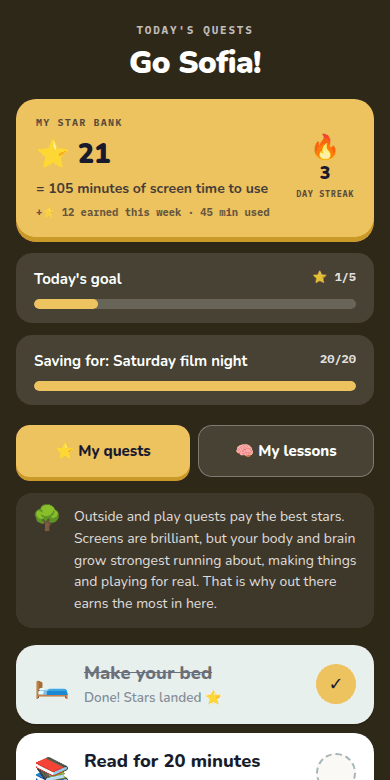
- Today’s jobs
The jobs you have agreed, with outside and play jobs paying the most stars.
- Their star bank
How many stars they have, and how many minutes of screen time those stars are worth.
- Something to save for
A goal of their own, like a film night, with a bar that fills as they earn.
- Short lessons
Lessons about life online with the Planet Friend they choose, at their own stage.
On your side
What you control
- Which jobs, and what each one pays
You approve every job, including the ones your child suggests, and set its stars.
- What a star is worth
Five minutes a star unless you change it, with a weekly cap you choose.
- Time no stars can buy
Bedtime, meals and school hours stay protected. A start inside them comes to you as an ask.
- A free daily core, if you want one
Some time that is simply theirs, so the screen is never the only prize.
Set up in a few minutes
On their home screen like any other app
- Make your free account
Three questions about your child, then an email and a password. No card needed.
- Open Share the app
It is a step on your Setup Quest. Your child scans the QR code on their phone or tablet.
- Add it to the home screen
On an iPhone or iPad tap Share, then Add to Home Screen. On Android open the menu, then Add to home screen. No app store, no login and no account for them.
- No device of their own?
Print the star chart and run the same quest on paper, or let them open it on your phone.
Start with three questions about your child
The stage check sets up your account and your child, then takes you straight to sharing their app.